Prompt guides tend to hand you templates someone wrote for the occasion. This one takes apart 381 prompts that actually ran and produced footage, pulled from 52 finished pieces. They were compiled rather than typed by hand, which turns out to be the useful part: the same structure repeats in all of them, and it is visible enough to copy.
The five parts, in order
- Style block — camera, film stock, palette, grain. Identical in every shot of the same piece.
- Frame binding — whether the clip starts and ends on supplied images, or only starts on one.
- Subject consistency clause — who must look identical throughout.
- Character bible — concrete physical description of each subject.
- Timecoded movement — the duration split into segments, each with its own action.
A full prompt averages about 850 characters. Most of that length is parts 4 and 5, and both exist for the same reason: to remove decisions the model would otherwise make for you.
Where these prompts come from
381 shot prompts across 52 finished pieces, all generated on FlyAIgh. The structural analysis and every count below covers the full set. The quoted prompts are only from our own boards — other people's scripts are their business, so they contribute to the statistics and nothing else.
Part by part
1. The style block. Bracketed, front-loaded, and repeated verbatim in every shot of the same piece:
Note what it contains: a format (large-format anamorphic), specific colour language (slate-blue, ember-orange, molten-gold), a light behaviour (volumetric god-rays), materials (hammered steel, rune-etched stone) and a film characteristic (35mm halation bloom). It does not contain anything about the action.
The repetition is the point. Each generation is a separate call with no memory of the previous one — anything you do not restate gets re-invented. Seven shots looking like one film is a consequence of seven identical style blocks.
2. Frame binding. One sentence, and it comes in two forms depending on whether the shot has a target ending:
- "Video starts from the first reference image (frame 1: opening pose) and ends at the second reference image (frame N: closing pose)." — both ends pinned.
- "Video starts from the first reference image (opening frame: composition and pose). From there the action plays out naturally per the motion description — the ending is not pinned to a target still." — only the start pinned.
The second form is worth noticing. Pinning both ends buys precision and costs naturalness, because the model has to arrive somewhere specific. When the shot just needs to move convincingly, leaving the ending open produces better motion.
3. The subject-consistency clause. Explicit, and it names names:
4. The character bible. Every named subject gets a compressed physical description, attributes separated by semicolons:
This runs alongside reference images rather than replacing them. The images carry likeness; the text carries the things an image cannot pin down — scale ("~40m wingspan filling the frame"), bearing ("road-hardened"), and what is deliberately absent ("none" where a mane would be).
5. Timecoded movement. The part that most separates these from ordinary prompts:
Total duration first, then labelled segments, then a one-line camera summary, then the aspect ratio. Sound gets described even on models that generate none — it costs nothing and it disciplines the pacing. "One continuous take, no cut" appears because a model handed a multi-beat description will sometimes invent its own cut inside a single clip.
One complete prompt
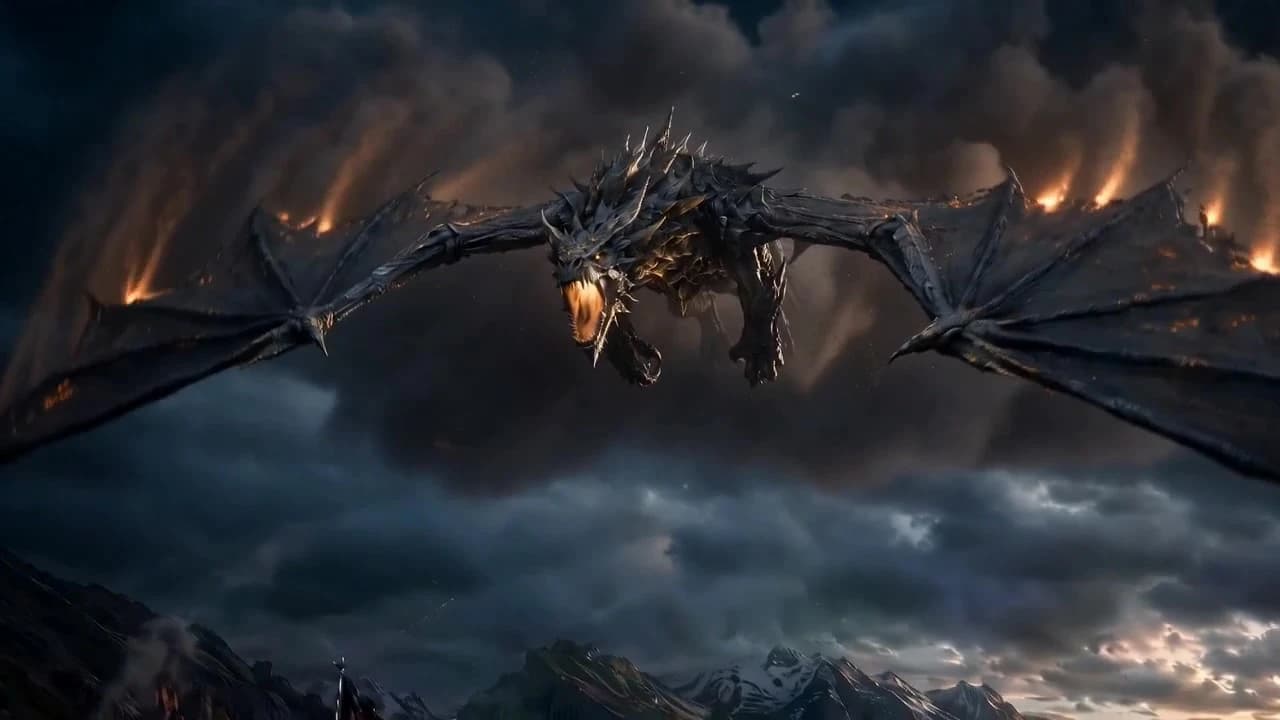
All five parts assembled, exactly as it ran — this is shot 2, the dragon at the top of this page:
The part nobody writes about: the cut
Everything above concerns a single shot. The layer almost no prompt guide covers is what happens between two shots — and it only shows up once you are assembling a sequence rather than generating clips one at a time.
In this set, 225 shots carry an explicit transition decision, each specifying four things: the cut type, the visual continuity that must survive it, whether sound leads or trails, and where the next shot gets its opening frame.
| Cut type | Count | Sound leads or trails | What it is for |
|---|---|---|---|
| clean-cut | 55 | 35 | Hard juxtaposition — the discontinuity is the point |
| match-action | 51 | 20 | A motion started in one shot completes in the next |
| smash-cut | 28 | 13 | Abrupt tonal break, usually on impact |
| eyeline-reaction | 27 | 13 | Someone looks, then we see what they see |
| axial-cut | 23 | 7 | Same axis, closer or wider — a punch-in |
| seamless | 15 | 7 | Stitch two clips into one unbroken move |
| dissolve | 14 | 14 | Time or place shift |
| match-cut | 12 | 6 | Shape or motion rhymes across the cut |
Two things stand out. Hard cuts and match-actions are nearly tied (55 to 51) — when someone actually decides, continuity-preserving cuts are chosen about as often as clean breaks. And every single dissolve carries an audio lead, 14 of 14, while clean cuts carry one only a quarter of the time. A dissolve without sound doing something across it reads as a slideshow.
Three decisions as written, from a seven-shot sequence:
- clean-cut, J-cut audio — "Hard juxtaposition cut from heroic climb to tyrant's reversal — the discontinuity is the power flip." Continuity note: keep the storm-sky lighting and preserve screen direction so the wave reads as hitting the citadel.
- match-action, L-cut audio — "The reforged Crown's light flows into the lifting gesture — continuous radiance carries the cut."
- seamless, from a different piece — "Continuous action exceeds generation limit; seamless stitch preserves unbroken temporal compression." That one is a technical constraint driving a creative choice: the move was longer than a single generation allows, so it was split and stitched.
How the next shot gets its first frame
Every transition also decides where the following shot starts. Across the same 225 decisions:
| Strategy | Count | What happens |
|---|---|---|
| fresh | 102 | New opening frame, no link to the previous shot |
| reference-prev-last | 94 | New frame generated, but guided by the previous last frame |
| blend | 14 | Mixed influence from both |
| video-extend | 8 | Continue from the tail of the previous clip itself |
| reuse-prev-last | 7 | Previous last frame used directly, nothing generated |
The near-even split at the top is the interesting part. Roughly four in ten shots reference the previous frame without reusing it — the new frame is generated, but conditioned on how the last one ended. That is the middle setting between total freedom and hard continuity, and in practice it gets picked almost as often as starting clean. Outright reuse is rare (7 of 225) because it locks the framing completely.
What these prompts produced
The seven-shot sequence quoted throughout, assembled in order. Thirty-five seconds, 280 credits, 720p. Six shots ran on Seedance 2.0 and the opening shot on Kling V3 Omni — a per-shot choice, not a platform default.
Nothing was retouched between shots. The consistency across them comes from the repeated style block, the character bible, and the transition decisions — the three things this article is about.
What this does not tell you
- These prompts are compiled, not typed. A script, a locked style and a cast of reference assets go in; this structure comes out. That is exactly why it is so consistent — and why treating it as evidence about how humans write prompts would be wrong.
- Structure is not quality. Every prompt here ran, but this article makes no claim about which produced good footage. Nothing in the data records that judgement.
- Most of the set is not in English. 311 of 381 are Chinese. The structure holds across both, but the phrasing conventions quoted here come from the 70 English ones.
- The transition data reflects one system's vocabulary. The eight cut types are the ones our Director can emit. A different tool would produce a different distribution — and one that offers no transition layer at all would produce none.
FAQ
What should an AI video prompt actually contain?
Across 381 production prompts the same five blocks repeat, in this order: (1) a style block holding camera, film stock, palette and grain, kept identical across every shot of the same piece; (2) a frame-binding sentence stating whether the clip starts and ends on supplied reference images or only starts on one; (3) a subject-consistency clause naming who must stay identical; (4) a character bible with concrete physical description of each subject; (5) a timecoded movement block that splits the duration into segments and states what happens in each. Averaged over all 381, a full prompt runs about 850 characters.
How long should an AI video prompt be?
The prompts in this set average roughly 850 characters — considerably longer than the one-line prompts most guides show. The length is not padding: most of it is the character bible and the timecoded movement breakdown, both of which exist to remove ambiguity the model would otherwise resolve on its own. Short prompts do not fail, they just hand more decisions to the model.
Should the style description be repeated in every shot?
Yes, and in this set it is repeated verbatim. Every shot of the same piece carries an identical style block — same camera, same stock, same palette. Each generation is an independent call with no memory of the last one, so anything not restated is re-invented. Repeating the style block is what keeps seven separately generated shots looking like one film.
What is a timecoded movement block?
Instead of describing the action as a whole, the duration is split into labelled segments: "Total 6s, one continuous take, no cut. 0-3s: slow push-in from the establishing silhouette toward the subject. 3-6s: camera arcs around to her hand as her fist closes on the shard." It pins pacing rather than leaving the model to distribute the action across the clip on its own.
How do you make separate AI shots cut together?
By writing the cut as part of the prompt rather than hoping it emerges. In this set 225 shots carry an explicit transition decision, each specifying four things: the cut type (match-action, smash-cut, eyeline-reaction, dissolve and so on), what visual continuity must survive the cut, whether sound leads or trails it (J-cut / L-cut), and where the next shot gets its opening frame. Almost no public prompt guide covers this layer, because it only appears once you are assembling shots into a sequence rather than generating them one at a time.
Should the next shot reuse the last frame of the previous one?
Sometimes, and it is close to an even split in practice. Of 225 explicit decisions, 102 generated a fresh opening frame and 94 referenced the previous shot's last frame — meaning the new frame is generated but guided by the old one. Only 7 reused the previous frame outright and 8 extended the previous video. Reuse buys hard continuity at the cost of framing freedom, so it tends to be reserved for seamless stitches where the action must not break.
Are these prompts written by hand?
No. They are compiled by FlyAIgh's Director from a script, a locked visual style and a cast of reference assets. That is why the structure is so consistent across 381 of them, and why the style block is byte-identical within a piece. The value in reading them is the structure itself — the same five blocks work whether a machine or a person assembles them.
Build a consistent character on FlyAIgh
Identity refs + AI-derived persona + outfit variants, bound to a character ID that auto-injects into every model. 25 free credits, no card required.