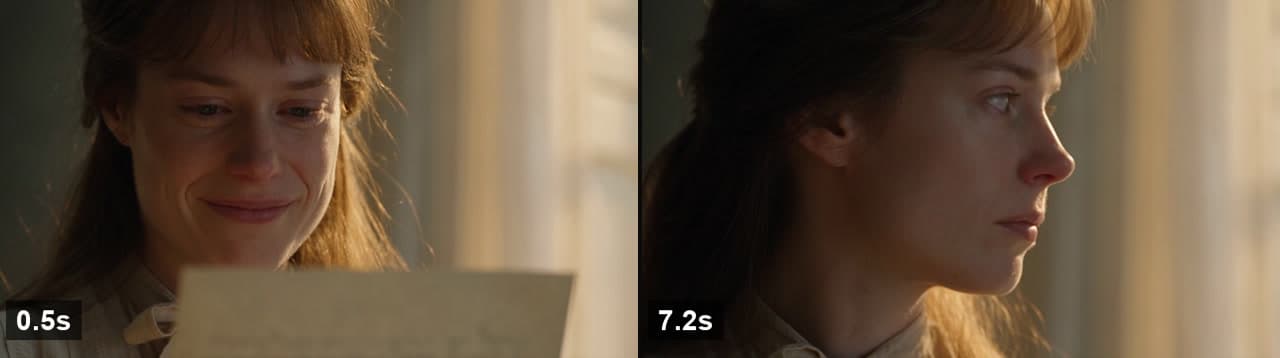
Runs: 2026-08-29 (Seedance 2.5, three attempts) · Published: 2026-09-01
The short answer
Every prompting guide now tells you to direct a performance instead of naming an emotion. Almost none of them show a finished clip with the beats timed against the script, so the advice circulates without evidence. We ran the same scene twice on Seedance 2.5, published both clips, and read every beat off the frames.
What the runs are useful for is narrower than confirming that action-based prompting works. The interesting behaviour is what a model does with the part it cannot film. Run A asked for “the smile stays on her mouth but leaves her eyes”, a contradiction that only a human performer can hold. The model did not skip it and did not fail. It rendered the closest visible thing: the smile went away. Every neighbouring clause in the same prompt, the blinks and the lift of the gaze, landed normally.
Run B described the same emotional turn as six observable events with no interior language at all. All six appeared, in an 8-second clip, on the first attempt. Two adjacent beats arrived in the opposite order from the script.
The two prompts
Same scene in both: a woman reading a letter, something in it lands badly. Same model, same day, same settings (720p, 16:9, text to video, no reference image). The only deliberate difference is whether the emotional turn is described from the inside or the outside.
Run A, 5 seconds, names an inner state:
Close-up on a woman in her thirties reading a handwritten letter, warm window light from the left, shallow depth of field. She holds a polite smile for someone off-camera. Her eyes drop to one line and the smile stays on her mouth but leaves her eyes; her jaw tightens, she blinks twice, her breath catches. She lifts her gaze past the lens, composed again. Subtle, restrained performance. No dialogue, no music.
Run B, 8 seconds, names only visible events:
Close-up on a woman in her thirties beside a window, warm afternoon light, shallow depth of field. She is smiling as she reads a letter held below frame. Her eyes move down one line and the smile fades from her face; her mouth settles flat, her gaze goes still. She lowers the letter slowly, breathes out, blinks twice, and turns to look toward the window. Quiet and restrained. No dialogue, no music.
Both are the same length of prose. Neither contains camera moves, lighting changes or shot transitions. The difference is entirely in whether a clause can be pointed at in a still frame.
Both clips, unedited
Neither clip was re-rolled, trimmed or graded. Audio was stripped for file size; both prompts asked for no dialogue and no music, and the source files carried no audio track.
Run A: the prompt names a feeling

The clause under test is “the smile stays on her mouth but leaves her eyes”. In the finished clip the smile is unambiguous at 0.4 seconds, visibly reduced by 2.0 seconds, and gone by around 3.4 seconds. The mouth is flat for the rest of the clip. The instruction to keep the smile was not followed.
What did follow is the rest of the same sentence. The gaze lifts past the lens at about 4.8 seconds, which is the last scripted beat and the clip's closing image. This is the part that makes the result interesting rather than a simple failure: the model parsed the sentence, executed the clauses it could stage, and replaced the one it could not with the nearest visible neighbour. A smile that is present but emotionally absent is not a thing a frame can contain. A smile going away is.
Two sub-clauses in that sentence, her jaw tightens and her breath catches, are below what we can adjudicate from sampled frames at this resolution, and we are not going to score them either way.
Run B: the prompt names actions
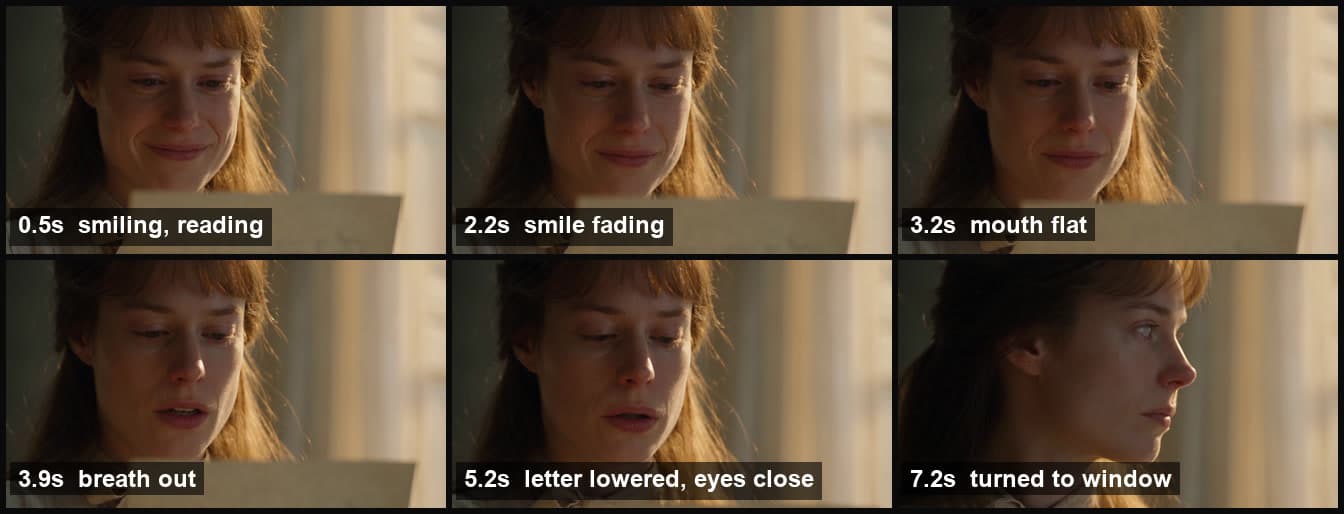
Run B rewrites the same turn with no interior vocabulary. Six things happen, all of them visible, and all six are in the clip on the first attempt:
| Scripted clause | Observed | Verdict |
|---|---|---|
| smiling as she reads | 0.0 to about 1.5s | Yes |
| the smile fades from her face | about 1.5s to 2.75s | Yes |
| her mouth settles flat | about 3.0s | Yes |
| she lowers the letter slowly | leaves frame between about 4.5s and 5.5s | Yes, late |
| breathes out | mouth opens at about 3.9s | Yes, early |
| blinks twice | eyes close from about 4.75s to 6.25s | Yes |
| turns to look toward the window | turn begins about 6.5s, full profile by 7.0s | Yes |
The one clause we would call under-delivered is blinks twice. What the clip gives is a long closing of the eyes across roughly a second and a half rather than two distinct blinks. It reads as the same emotional beat, but a count in a prompt is not a count you get back.
One thing the model added on its own: from the first frame her eyes already read as wet, before anything in the letter has landed. The prompt said only that she is smiling as she reads. This is a subjective call on our part, and it is the kind of thing worth knowing about a model that is being sold on cinematic quality. It brings its own interpretation of a scene along with your instructions.
Two beats arrived out of order
The script says she lowers the letter slowly, breathes out, blinks twice. The clip breathes out first, at about 3.9 seconds, and the letter clears frame afterwards, between roughly 4.5 and 5.5 seconds. Both events happen; the order is reversed.
This matters if you are writing beats to be cut against something. The overall arc held: the clip opens smiling and closes in profile, exactly as scripted, and no beat was dropped. But adjacent beats separated by a second or less should be treated as a set the model will stage in roughly that region, not as an edit timeline. Our separate 25-second timecoded test found the same character of behaviour at a larger scale: time ranges steer pacing rather than fixing exact cut points.
The third run was refused
Between Run A and Run B we tried a third version. It is the same scene pushed harder in the direction every prompting guide recommends, toward concrete physical specificity:
Extreme close-up on a woman's face in her thirties [...] Her eyes track down one line and her smile drops away completely: the mouth goes flat, her eyes widen, she stops moving for a full beat. Her fingers crush the edge of the paper, crumpling it. She swallows hard, blinks fast twice, then turns her face away from the letter toward the window.
That run was refused by content moderation with error code 1501, and no clip was produced. The run was not billed. The softer wording of the same six beats, Run B, passed on the next attempt.
We are reporting the refusal as an observed outcome and not guessing at the trigger. Three elements changed at once (extreme close-up framing, the crushing of the paper, the widened eyes), and a single refusal cannot attribute the cause to any one of them. What it does establish is that the standard advice has an upper bound nobody states: on a close-up of a realistic person, escalating physical specificity is the direction the moderation wall is in. Our measured refusal rates across 11 models show the same input passing some models and failing others routinely, so a refusal here is a fact about this attempt and not a property of the scene.
How to audit your own clip
None of the above is readable from watching the clip at normal speed. A smile fading across 1.25 seconds and a breath at 3.9 seconds are things you find by looking at frames next to each other. The tooling is one command:
# a 4x4 contact sheet covering 4 seconds at 0.25s spacing
ffmpeg -i clip.mp4 -vf "fps=4,scale=320:-2,tile=4x4" -frames:v 1 sheet.png

# start the window later in the clip
ffmpeg -ss 4 -t 4 -i clip.mp4 -vf "fps=4,scale=320:-2,tile=4x4" -frames:v 1 late.png
Read the sheet left to right, top to bottom, with your prompt clauses beside it. Every claim in this article was produced this way and the frame positions are stated so you can reproduce them against the published clips.
video.currentTime and drawing to a canvas, can silently return the same frame over and over with no error thrown and no warning logged. We did exactly that first. It produced two contact sheets, at 8 and 24 frames, in which every panel was identical, and we published a conclusion from them that was wrong twice over before re-checking with ffmpeg. If your sheet shows a clip where nothing changes, suspect the tool before you suspect the model.Method and limits
- One model, one scene, three attempts. All three runs are Seedance 2.5 via text to video on 2026-08-29, at 720p and 16:9, submitted directly to the supplier API rather than through our own interface. This is not a comparison between models and says nothing about how any other model handles performance direction.
- First attempt, no re-rolls. Each surviving clip is the only generation of that prompt. Neither was selected from a batch. A second roll of either prompt could land differently.
- Timings are sampled, not exact. Frames were pulled at 0.25 to 0.5 second intervals with ffmpeg, so every timestamp here carries that much uncertainty. Ranges are written as ranges for that reason.
- Two clauses were not scored. “Jaw tightens” and “breath catches” in Run A are finer than our sampling can settle. We left them unscored rather than guess.
- The two runs differ in duration. Run A is 5 seconds and Run B is 8 seconds. Some of Run B's completeness is the extra three seconds, not the phrasing. The specific finding about the unfilmable clause does not depend on duration: the smile in Run A had already gone by 3.4 seconds, well inside its own runtime.
- Reading a face is subjective. “Smile gone,” “mouth flat” and “already wet eyes” are our readings. Both clips are published in full so you can extract the same frames and disagree.
At publication pricing, Run A cost 77 credits and Run B cost 122 credits at 15.3 credits per second for 720p. A credit costs roughly $0.018 to $0.030 depending on plan, which puts the whole test, including the refused attempt, under $6.
FAQ
Do AI video models follow acting directions?
In this test, yes for anything a camera can see, and only approximately for anything it cannot. Both runs executed their visible instructions: blinks, a head turn, a hand lowering a letter, a smile changing. The clause that did not execute was the one describing an inner state, "the smile stays on her mouth but leaves her eyes." That is a contradiction only a human actor can hold, and the model rendered the nearest filmable thing instead: the smile simply went away. Nothing was dropped; the unfilmable half was approximated down to something visible.
Why does my AI video character hold the same expression for the whole clip?
The common cause is a prompt that names an emotion rather than a sequence of visible changes. "She is heartbroken" gives the model one state to hold for the entire duration, so it holds it. A chain of observable events gives it something to stage over time: smile fades, mouth goes flat, she lowers the letter, breathes out, blinks, turns away. In our 8-second run every one of those six events appeared in the finished clip. Duration matters too. A 5-second clip has room for roughly two or three changes, not six.
Should I write emotions or physical actions in an AI video prompt?
Write physical actions, with one caveat that prompt guides rarely mention. Actions are what the model can render and what you can later verify frame by frame. But pushing physical specificity too far on a close-up of a realistic person can trip content moderation. Our third run of this same scene, rewritten with "extreme close-up," "her fingers crush the edge of the paper," and "her eyes widen," was refused with error 1501 while the softer wording of the same beats passed. The workable middle is concrete, observable, and calm: describe what changes, not how violently.
Do AI video models follow the order of actions written in a prompt?
Approximately, and not strictly. Our 8-second run landed all six scripted beats, but two adjacent ones swapped: the script had her lower the letter and then breathe out, and the clip has the breath at about 3.9 seconds and the letter leaving frame between roughly 4.5 and 5.5 seconds. The overall arc, from smiling to turned away, matched the script. Treat a beat list as a set of events with a rough sequence rather than as an edit timeline, and do not depend on the exact ordering of two beats that happen within a second of each other.
How do I check whether an AI video actually followed my prompt?
Extract frames at fixed intervals with ffmpeg and read them against your prompt clauses. A command such as ffmpeg -i clip.mp4 -vf "fps=4,scale=320:-2,tile=4x4" -frames:v 1 sheet.png gives you a contact sheet covering 4 seconds at 0.25-second spacing. Do not use the obvious browser method of seeking a video element and drawing to a canvas: it can return the same frame repeatedly with no error, which is exactly what happened to us and produced two wrong conclusions before we switched tools.
Every model in this article, on one account
Prices and capabilities for each model are on their own pages, and the price of a run is shown before you start it.